This is my learning note from the book Designing Cloud Data Platforms written by Danil Zburivsky and Lynda Partner. Support the authors by buying the book from Designing Cloud Data Platforms – Manning Publications
Data platform on Azure
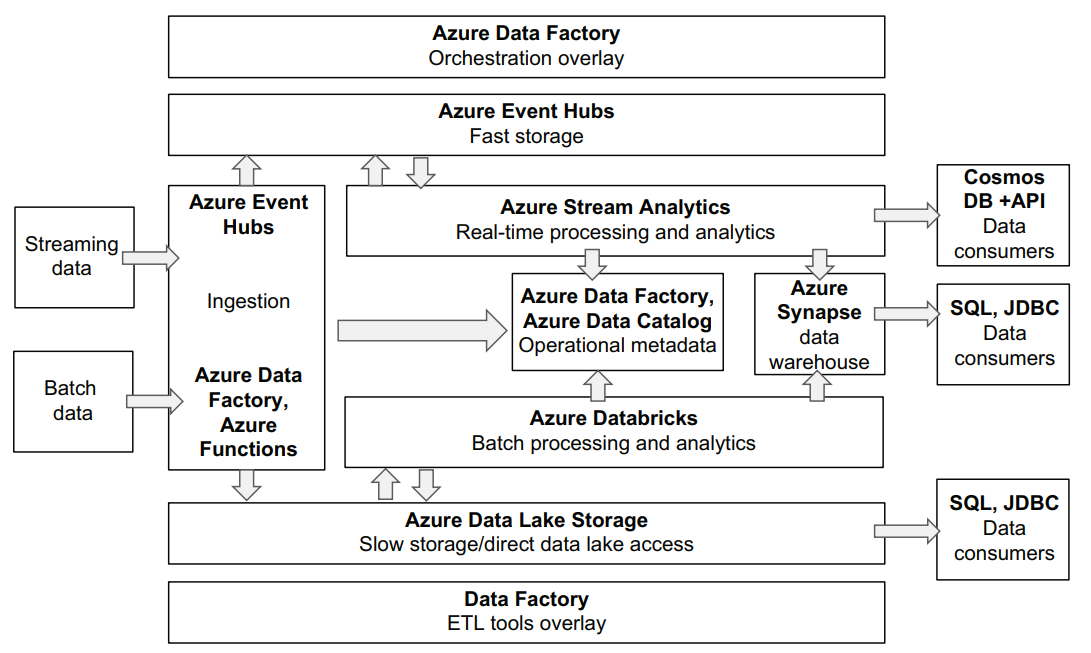
BATCH DATA INGESTION
Azure Data Factory is an ETL overlay service that supports batch ingestion. Currently, Data Factory supports a wide range of RDBMS products, ingesting flat files from FTP, Azure Blob Storage, S3, and Google Cloud Storage; NoSQL databases such as Cassandra and MongoDB; and a growing number of connectors for external SaaS platforms such as Salesforce and Marketo. Data Factory also integrates with most Azure data products like Cosmos DB, Azure SQL Database, and many others.
Compared to AWS and Google ETL overlays, Data Factory offers the biggest library of connectors and supports some extensibility in the form of a generic HTTP connector. You can use this connector to implement your own ingestion pipelines for REST APIs (internal or external) that may not be currently supported out of the box. As with other cloud providers, Azure has support for a serverless execution environment called Azure Functions that can be used to implement your own ingestion mechanisms in one of the two currently supported languages: Java and Python.
STREAMING DATA INGESTION
Azure Event Hubs is a service that allows you to send and receive data from streaming sources. It is similar in functionality to AWS Kinesis and Google Cloud Pub/Sub. A unique feature of Event Hubs is its compatibility with Apache Kafka API. We will talk about Kafka later in this chapter, but API compatibility means that if you have existing investments or skills with Kafka, it will be easier to migrate to Event Hubs. Event Hubs Capture is a supporting service to Event Hubs that allows you to save messages from Events Hubs into various Azure services, such as Azure Blob Storage or Azure Synapse.
DATA PLATFORM STORAGE
Similar to other major cloud providers, Azure offers a scalable and cost-efficient data storage service called Azure Blob Storage. On top of this service, Azure has implemented a new service offering called Azure Data Lake Storage. This service provides several improvements over regular Azure Blob Storage, especially when it comes to performance of large-scale data processing jobs.
BATCH DATA PROCESSING
Azure doesn’t offer services like AWS EMR or Google Cloud Dataproc. Instead, they have partnered with a company called Databricks to offer a flexible environment to execute Apache Spark jobs. Databricks was founded by the original creators of Apache Spark and currently offers its managed Spark environments on both Azure and AWS. Azure Databricks provides seamless integration with the rest of the Azure ecosystem. It has connectors to work with data in Azure Data Lake Storage, read and write data to Azure Warehouse, etc.
REAL-TIME DATA PROCESSING AND ANALYTICS
Azure Stream Analytics is a service that allows you to perform data transformations and analysis on messages from Event Hubs. Stream Analytics uses a SQL-like language to do this. You can save the results of the Stream Analytics job to a number of supported destinations. Currently this includes a new Event Hubs destination, Azure Data Lake Storage, a SQL database, and Cosmos DB. Since Event Hubs is compatible with Kafka, you can also implement your own Kafka Streams real-time pipelines or migrate existing ones.
CLOUD DATA WAREHOUSE
Azure Synapse is a scalable, cloud-native warehousing service. It’s built on top of proven MS SQL Server technology and offers several compelling features.
First, Azure Synapse separates storage from compute resources. When creating a new Azure Synapse warehouse, you need only specify how much computational capacity you will need, as storage is adjusted automatically based on your needs. This means that you can scale your Azure Synapse data warehouse compute resources up and down on demand while keeping the data on the storage intact. For example, you can switch to a lower computer tier during off hours or on weekends to reduce cost.
The Azure Synapse model is a hybrid between AWS Redshift, where data has to be stored locally on the cluster machines, and BigQuery, where Google Cloud manages both compute and storage capacity for you. In Azure Synapse, you have full control over how much compute you need, and storage is managed for you. Since Azure Synapse is built on top of relational database technology, it offers robust SQL support and is compatible with all the tools that have JDBC/ODBC driver support. With the recent updates, Azure Synapse also supports storing and processing JSON data.
DIRECT DATA PLATFORM ACCESS
A recommended way to access and process data stored in Azure Blob Storage is to use an Azure Databricks platform. Databricks is a third-party company that provides a data processing platform based on Apache Spark. Databricks significantly simplifies creating and managing Spark clusters and focuses on providing a collaborative environment for multiple teams to work on the same data sets. You can use Spark SQL to issue SQL queries to work directly on the data in Blob Storage, or you can use native Spark APIs. Databricks allows you to easily create multiple independent clusters that have access to the same data sets. This simplifies resource management and allows fine tuning your processing clusters to fit a specific task.
What’s unique about the Azure Databricks service is that it’s natively integrated into the Azure platform and looks and feels just like another Azure service. There are Azure APIs that allow you to create and manage Databricks workspaces, and Azure provides out-of-the-box integration with other data services like Data Factory, Azure Synapse, and others.
ETL OVERLAY AND METADATA REPOSITORY
Azure Data Factory is an ETL service that you can use to ingest data from sources, process it, and then save data to various destinations. Data Factory provides a UI where you can construct, execute, and monitor your pipeline, but it also has very robust API support, which makes it possible to automate pipeline creation and deployment. This is an important feature that allows your ETL pipeline to be made a part of the continuous integration/continuous deployment (CI/CD) process.
Data Factory currently has limited support for data transformations that work out of the box—mostly converting files from one format to another. To allow users to perform more complex transformations, Data Factory provides hooks into Azure Databricks. This way you can use Data Factory to ingest data from the source and then execute a complex Spark transformation job using an Azure Databricks hook. When it comes to pipeline-specific metadata, Azure Data Factory captures and allows you to monitor metrics like pipeline success/failure, duration, and a few others. Currently, the number of available metrics is quite limited and doesn’t allow you to capture events like schema changes, data volume changes, and so on.
Google Cloud Data Catalog is a separate service that is more focused on business metadata (data that adds business context to other data, providing information authored by business people and/or used by business people) and data discovery functionality. It integrates with various Azure and external sources and allows you to create a searchable catalog of existing data assets. Additionally, it can perform basic data profiling (total number of rows, number of distinct or empty values in each column, and so on) for sources that support SQL access.
ORCHESTRATION LAYER
Azure Data Factory provides pipeline-scheduling capabilities and also supports complex pipeline dependencies. For example, you can create a chain of pipelines, where as one pipeline finishes successfully, it triggers another pipeline, and so on.
DATA CONSUMERS
Azure Synapse provides full support for SQL consumers, including JDBC/ODBC drivers. This means you can easily connect your favorite reporting client, BI, or SQL to it.
Azure Databricks also offers JDBC/ODBC connectivity for reporting tools, but to use it, you must ensure that there is an Azure Databricks cluster capable of processing incoming queries that is always on. This approach may be expensive. For application consumers who require more real-time direct access to the data platform, Azure offers a fast document-oriented database called Cosmos DB. You can save the results of your realtime analytics there and then either connect your applications directly to Cosmos DB using client libraries or build an API layer around it for more controlled data access.


