This is my learning note from the book Designing Cloud Data Platforms written by Danil Zburivsky and Lynda Partner. Support the authors by buying the book from Designing Cloud Data Platforms – Manning Publications
Ingesting data from files
There are two primary ways to deliver files into a cloud data platform. The first one is to use a standard File Transfer Protocol (FTP) or SFTP, a more secure version of FTP. FTP is a popular protocol supported by many ETL tools. It requires a dedicated server to host files and to allow various clients to connect to it using username and password as an authentication option.
An alternative approach that we see gradually replacing the traditional FTP file exchange method is the use of cloud storage instead of an FTP server.
Here, files are saved to a cloud storage, and an ingestion app just copies files from one cloud storage to another. The benefits of cloud storage over FTP are elastic storage; use of secure file transfer mechanisms provided by cloud vendors that make network configuration simpler; security options such as temporary access keys that expire after some time; and data access auditing features.
Tracking ingested files
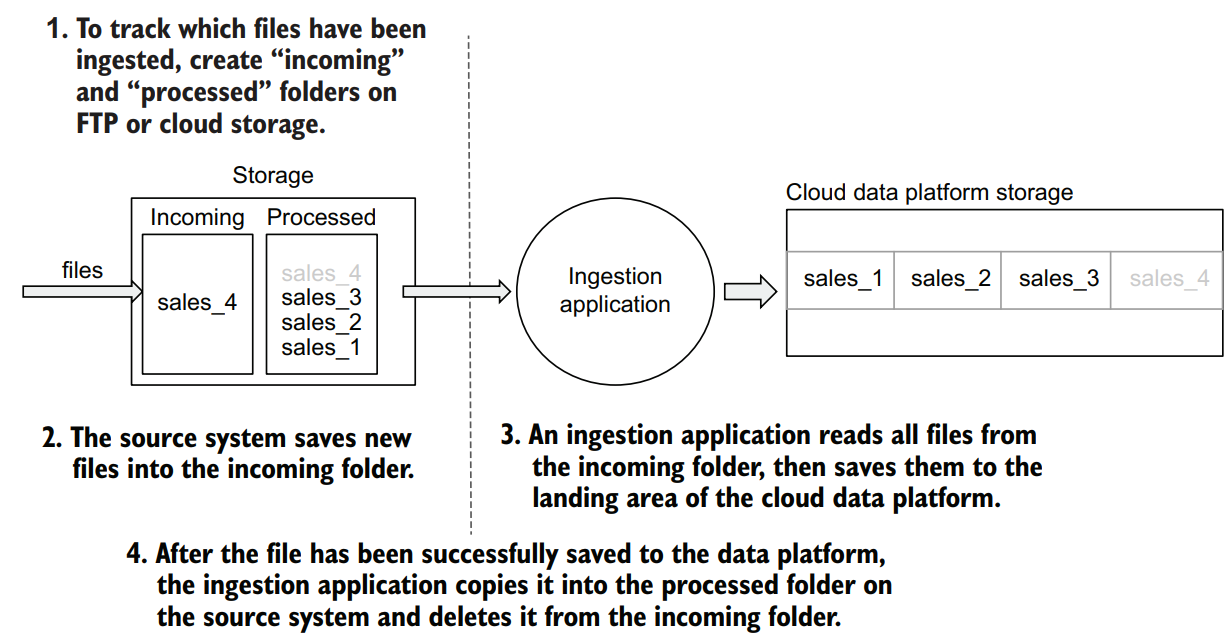
Unlike ingesting data from RDBMSs, with files there are fewer concerns about whether we are dealing with full or incremental ingestion. A file on FTP or a cloud storage is an immutable data set—once the source system finishes writing to it, it doesn’t change. This means that your ingestion pipeline should not be concerned with tracking which specific items for a file have already been ingested and which have not. But what needs to be tracked carefully is which files have already been ingested into the cloud data platform and which have not. One of the methods of tracking which files have been ingested is to structure your folders on FTP or cloud storage to have “incoming” and “processed” folders
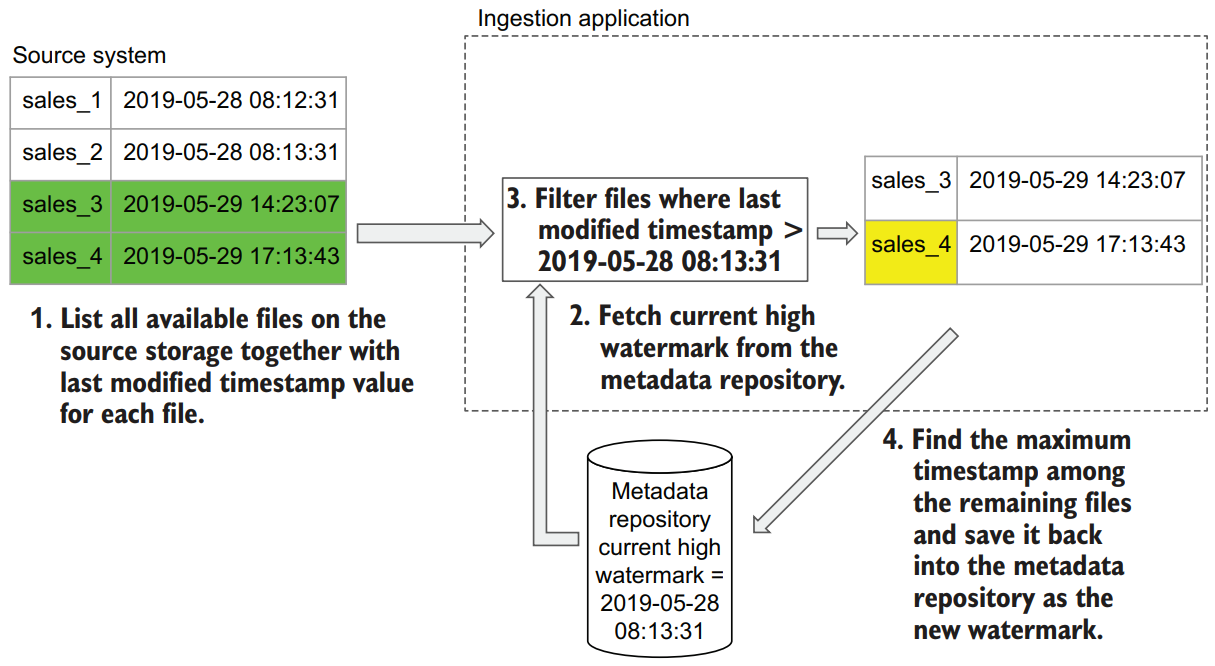
Here is a possible different approach. Each file, either stored on FTP or a cloud storage, has a set of metadata stored with it. One of the attributes of a file is a timestamp of when the file was last modified. We can use this timestamp to identify only new files that have been added after a certain time. The approach we use here is very similar to the incremental ingestion with RDBMSs.
Ingesting data from streams
Streams are becoming an increasingly popular way to exchange data between multiple software systems, with Apache Kafka becoming the de facto standard for a message delivery system.
When it comes to ingesting data from a stream, we usually see two main scenarios. The first one is streaming, or real-time, ingestion. In this scenario, what is important from the end user’s perspective is that data be ingested into the cloud data platform, including into the warehouse, as fast as possible, but this data is then used for analysis in an ad hoc and not necessarily real-time manner.
The second scenario is when, in addition to ingesting data in real time, you also need to perform some non-trivial computations and analytics on the data as it comes in. This is called real-time analytics, as opposed to real-time ingestion. This chapter will focus on the real-time ingestion scenario, and real-time analytics will be covered in great detail in chapter 6.
If we are receiving messages one by one, we can no longer just save them as files to our cloud storage landing area—this would mean creating a file for each message! Streaming systems usually receive messages at a very high rate, so saving them directly to cloud storage wouldn’t work from a performance perspective. This is where the fast storage from our data platform architecture comes into play.
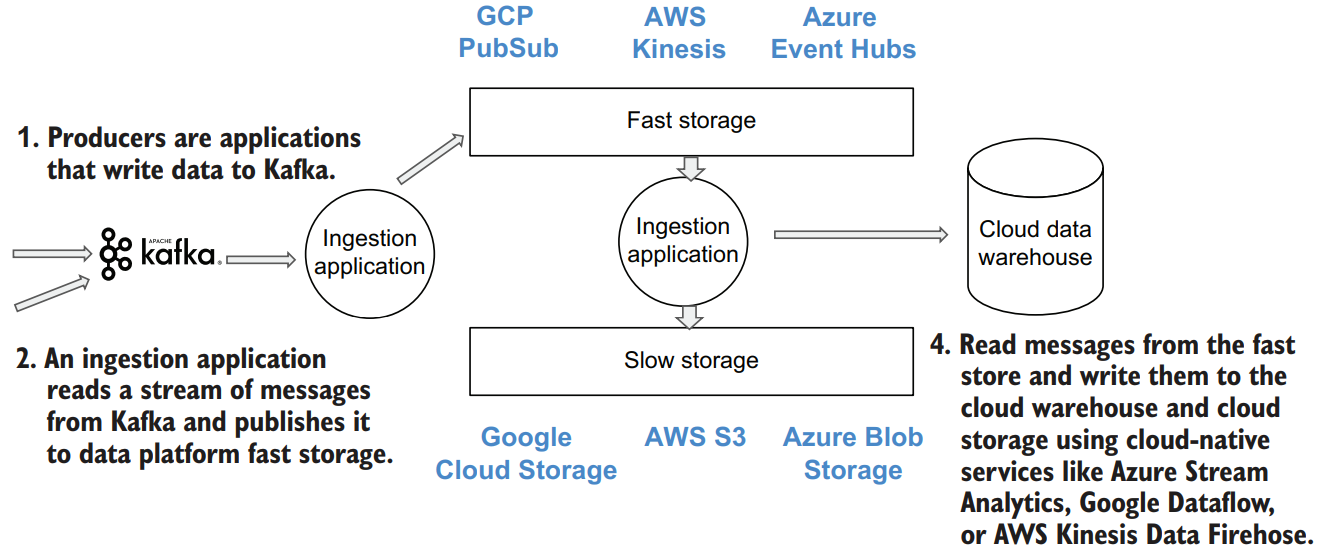
Some cloud services (Azure Stream Analytics, Google Cloud Dataflow, and AWS Kinesis Data Firehose) can be used to save messages to the regular cloud storage. We need to keep in mind that cloud storage is not optimized for dealing with lots of small files, so if we were to write each message as a separate file, the performance of our pipeline would be really bad. Instead, a common approach is to batch messages together and write them to storage as a single large file. We recommend keeping the size of the files at several hundreds of MBs or more. This may not always be possible if your ingestion stream is low volume. You will need to find a balance between the resulting size of the file and the time it takes to accumulate that volume of messages.
Ingesting data from SaaS applications
Developers of SaaS applications will never give you direct access to the underlying databases, for security and scalability reasons. This leaves us with two common ways to extract data: APIs and file exports. File exports are less and less common these days, because APIs provide more flexibility for consumers and more control for the SaaS application owners.
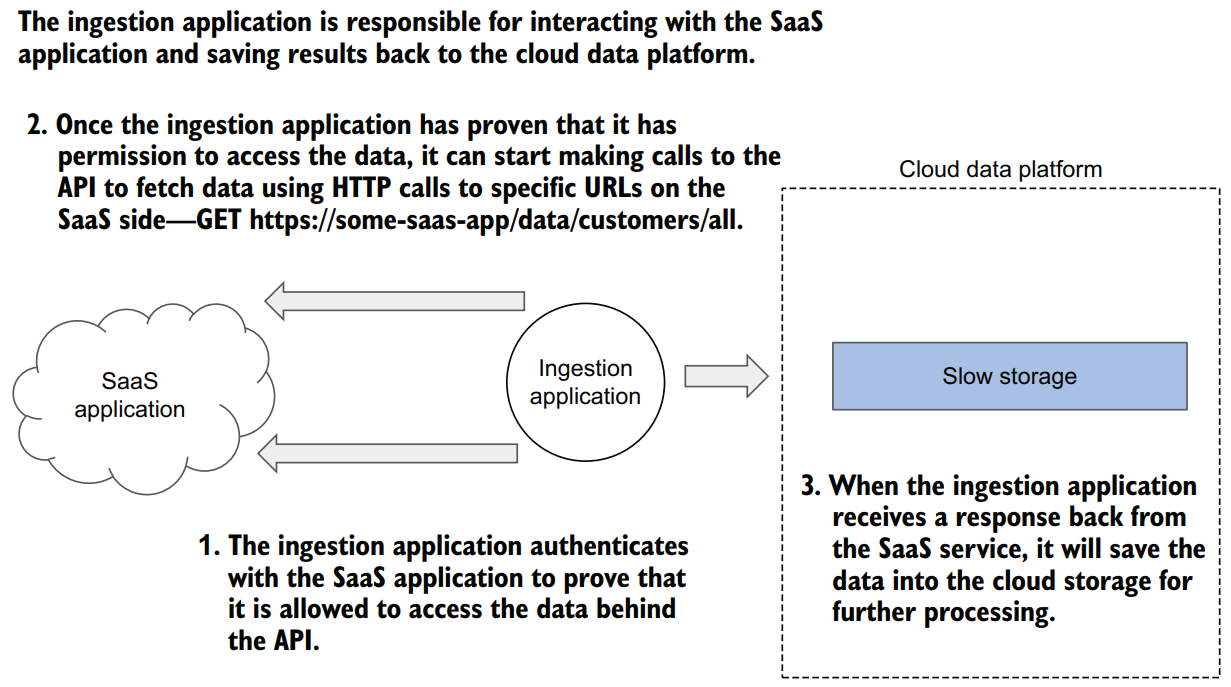
First of all, this ingestion application needs to authenticate somehow with the SaaS side to prove that it is allowed to access the data behind the API(1). Different SaaS providers use different authentication methods: username/password combinations or authentication tokens, and today using the OAuth protocol
Once the ingestion application has proven that it has permission to access the data, it can start making calls to the API to fetch data (2)
Finally, when the ingestion application receives a response back from the SaaS service, it needs to save the data into the cloud storage for further processing (3). Typically, a web API would return data as a JSON document or a collection of documents
In reality, there are many challenges with implementing a robust SaaS ingestion pipeline:
- No standard approach to API design
- No standard way to deal with full vs. incremental data exports
- Resulting data is typically highly nested JSON


How data platforms work in 3 steps?
What are the parts of a data platform?
What are cloud data platforms?
What is a data platform example?