This is my learning note from the book Designing Cloud Data Platforms written by Danil Zburivsky and Lynda Partner. Support the authors by buying the book from Designing Cloud Data Platforms – Manning Publications
Ingesting data from relational databases
Ingesting data from RDBMSs using a SQL interface
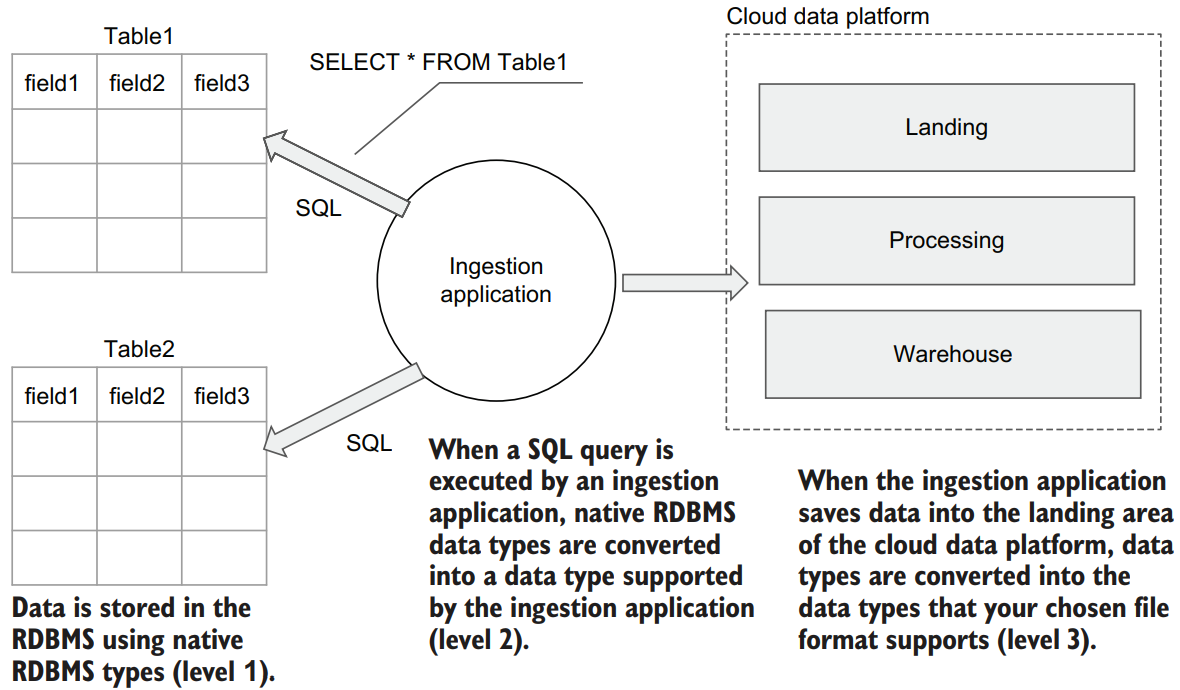
On level 1, data is stored using native RDBMS types. Then, when a SQL query is executed by an ingestion application, these native RDBMS data types will be converted into a data type supported by the specific programming language in which the ingestion application is implemented (level 2). Finally, when the ingestion application saves data into the landing area of the cloud data platform, data types must be converted once again into the data types that your chosen file format supports (level 3).
Since data type mapping is not always one to one, and given that during the ingestion process from RDBMSs, data types change at least twice, data types mapping is important. We will talk more about this later in this chapter. Finally, if all your ingestion application can do is execute SELECT * FROM some_table, then you are limited to doing only full-table ingestion. In many scenarios, this is not enough, and a more sophisticated way of identifying and ingesting new or changed data is required.
Full-table ingestion
When designing a data ingestion pipeline for our cloud data platform, we need to decide how to deal with this constantly changing data.
NOTE There is a difference between which data is important in an operational database and which is important in an analytical data platform. Operational databases are usually concerned with the question of “What is the current state of some item?” It could be which items are in the shopping cart right now, what is the user’s account balance, or how many green gems did a player collect in the current game? Analytical data platforms are usually concerned with the question “How did a given item change over time?” In which order did the customer add items into the shopping cart? Did they add some items that were later removed? To be able to answer these questions, analytical data platforms need to store data differently than operational databases.
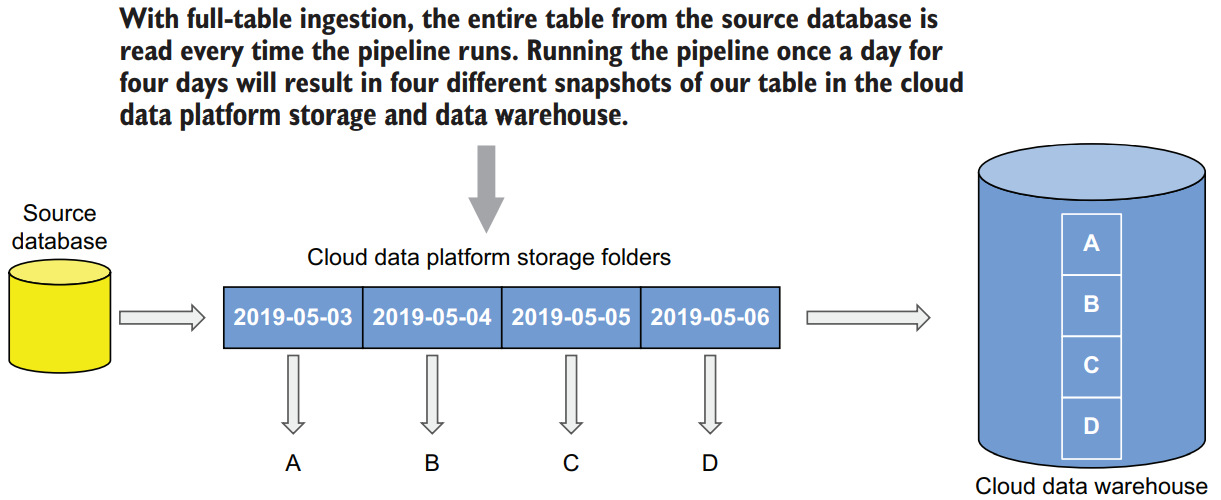
While full-table ingestion is easy to implement (simply execute a full SELECT statement against the required tables on a regular basis) if the source table is large, the process will become inefficient. Doing a full-table extract of a large table (tens of GBs or more) will put an extra load on the source database server. If the source database is located on premises then, depending on the network bandwidths you have between the data center and specific cloud region, transferring large data volumes into the cloud will take time—sometimes significant amounts of time. Second, while the cloud provides almost unlimited scalability for storage, it comes with a cost. If your source table is hundreds of GBs, and you do a full snapshot daily, then in a year this table alone will be responsible for about 36 TB of data. To address these issues, you can design your ingestion pipeline to ingest only data that is new or that has changed since the last ingestion. This process is called incremental ingestion, and we will look into it next.
Incremental table ingestion
On a high level, the idea behind incremental ingestion is simple—instead of pulling the whole table on every ingest, we will pull only new rows and rows that have changed since the last ingestion.
For new rows, this column will contain the date and time of when this row was inserted, and for updated rows, it will contain the last time this column was modified.
Now to implement our incremental ingestion process, we must adjust the SQL query that we run to extract data from the source. Instead of pulling all rows, it will pull rows that have LAST_MODIFIED timestamp in the source table greater than the MAX(LAST_MODIFIED) timestamp in the data platform that we have recorded during the previous ingestion
NOTE We strongly recommend using RDBMS capabilities to track last-modified timestamps, if they exist. It’s possible to implement a similar process on the application side, but this approach is error prone.
An incremental ingestion process helps address some of the challenges with fulltable ingestions—you need only bring in new and changed data, and you can avoid large data set transfers. However, an incremental ingestion process still doesn’t address some of the fundamental problems with a SQL-based ingestion process. The first is one we already mentioned in the context of full-table ingestion. If you only read data that currently exists in a source table, you will miss deleted rows. Unless your application is designed specifically to not delete rows and rather mark them as deleted using a special column, then you can only infer deleted rows by comparing previous snapshots and finding missing rows. This is extra development work in the processing layer that you may want to avoid.
Change data capture (CDC)
Every production RDBMS writes row changes into a log. While different vendors name them differently—redo logs, transaction logs, binary logs—change data capture as an ingestion mechanism involves parsing these logs using a CDC application and sending a stream of changes to the target storage system from the log file
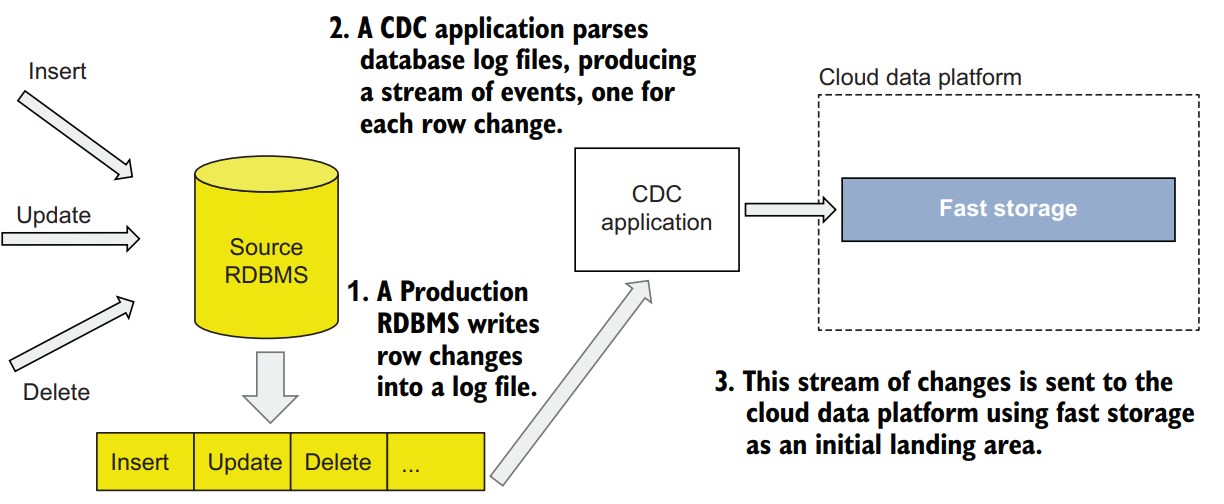
CDC applications are sometimes available from RDBMS vendors—for example, Oracle GoldenGate—or are implemented as third-party applications, such as the open source project Debezium. These third-party applications can be either external to the cloud data platform or can be run as a cloud-native service as a part of the data ingestion layer, such as AWS Database Migration Service.
The trade-offs are that you may add licensing costs for a CDC application, and CDC is more complex to implement because it requires a realtime infrastructure
Ingesting data from NoSQL databases
The challenge with building an ingestion pipeline for a NoSQL database is that there is no single standard on how data can be extracted from them and in which format it will be presented to the ingestion applications
We can still outline some of the most common ways to ingest data from NoSQL databases into our cloud data platform:
- Use an existing commercial or SaaS product for ingestion from a NoSQL database. This is the path of least resistance if using such a product fits into your technology landscape and budget. Vendors who sell data ingestion tools usually have a rich set of various connectors to NoSQL databases.
- Implement a dedicated ingestion application for your NoSQL vendor. You will need to develop an ingestion application that uses client libraries specific to your NoSQL database. This approach gives you the most flexibility because you can use all the features your database has. You can also implement full or incremental ingestion using guidelines we described earlier in this chapter.
- Use a change data capture plugin, if available. Some of the popular NoSQL vendors have change data capture plugins available. For example, there is a Debezium connector for MongoDB that captures all changes done to the database and writes them as a stream to Kafka
- Use export tools provided by your NoSQL database. Most of the databases come with tools that allow users to export data into a text format (CSV or JSON, usually) for backup or migration purposes. You can schedule these tools to run periodically and then build the ingestion pipeline to only work with resulting text files. This approach will simplify your ingestion pipeline, but you might be limited to doing only full exports if your NoSQL database doesn’t support incremental data extracts.


